Unlock Learning: Best Educational Apps for Kids
best educational apps for kids

Unlock Learning: Best Educational Apps for Kids

Transform screen time into engaging educational adventures with our expertly curated selection of top apps.

Find Your App Now

Key Takeaways

  • ✓ Over 80% of parents believe educational apps improve their child's learning.
  • ✓ Interactive apps can significantly boost engagement and retention compared to traditional methods.
  • ✓ Many top educational apps align with national curriculum standards, supporting school learning.
  • ✓ Selecting age-appropriate apps is crucial for maximizing educational benefits and minimizing frustration.

How It Works

1
Identify Learning Goals

Consider your child's age, interests, and specific areas where they could use a boost. Are they struggling with math, or do they need to develop reading comprehension?

2
Research and Compare Options

Utilize trusted reviews, educational platforms, and articles like this one to explore apps that align with your goals. Look for apps with strong educational foundations and positive user feedback.

3
Trial and Observe

Many apps offer free trials or introductory levels. Let your child try a few options and observe their engagement, understanding, and enthusiasm. Pay attention to the app's user interface and overall experience.

4
Integrate into Routine

Once you've found a suitable app, integrate it into a balanced learning routine. Encourage interactive play and discussions about what they're learning to maximize its educational impact.

Why Educational Apps Are Essential for Modern Learning

A young girl using a tablet for online learning, focused and engaged with her digital pen. Photo: Ryan Delfin / Pexels
In an increasingly digital world, the role of technology in education has evolved from a supplementary tool to an integral component of a child's learning journey. For today's children, who are digital natives, educational apps offer a familiar and engaging medium through which to explore complex concepts, develop critical thinking skills, and foster a lifelong love for learning. The sheer accessibility of these tools, often available on devices already present in most households, means that learning is no longer confined to the classroom or traditional textbooks. Instead, it can happen anytime, anywhere, transforming mundane moments into opportunities for intellectual growth. This pervasive availability makes finding the best educational apps for kids not just a convenience, but a necessity for parents and educators alike. One of the most significant advantages of educational apps is their ability to personalize the learning experience. Unlike a one-size-fits-all curriculum, many apps employ adaptive learning technologies that adjust to a child's individual pace and proficiency level. If a child is excelling in a particular area, the app can present more challenging material; if they're struggling, it can offer additional practice and different explanations. This tailored approach ensures that children are consistently challenged without being overwhelmed, leading to greater confidence and a deeper understanding of the subject matter. Furthermore, the interactive nature of these apps, often incorporating gamification elements like points, badges, and progress tracking, turns learning into an enjoyable and rewarding activity. Children are motivated to continue playing and exploring, not just for the sake of completion, but for the inherent satisfaction of mastering new skills and achieving goals. This intrinsic motivation is far more powerful than external pressure, leading to more sustainable learning habits. Beyond academic subjects, the best educational apps also play a crucial role in developing essential 21st-century skills. Many apps are designed to enhance problem-solving abilities, creativity, critical thinking, and even social-emotional learning. For instance, coding apps introduce computational thinking from an early age, while storytelling apps encourage imaginative expression and language development. Simulation apps can teach about cause and effect, scientific principles, or historical events in an immersive way that traditional methods often cannot replicate. The immediate feedback provided by these apps allows children to understand their mistakes and correct them in real-time, fostering a growth mindset where errors are seen as opportunities for improvement rather than failures. This continuous loop of action, feedback, and adjustment is a cornerstone of effective learning. As parents navigate the vast ocean of digital content, discerning which apps genuinely contribute to their child's holistic development becomes paramount. It's not just about occupying screen time; it's about enriching it with meaningful, impactful learning experiences that prepare children for a future where adaptability and continuous learning are key. Choosing the right app can unlock a world of potential, making learning an exciting adventure rather than a chore.

Navigating the App Store: What to Look For in Educational Apps

A young girl using a tablet for online learning, focused and engaged with her digital pen. Photo: Ryan Delfin / Pexels
With thousands of educational apps flooding the market, discerning the truly valuable from the merely distracting can be a daunting task for parents. To ensure that screen time is genuinely productive, it's crucial to approach app selection with a discerning eye, focusing on several key criteria that define a high-quality educational experience. The first and perhaps most important factor is alignment with educational goals and age appropriateness. An app designed for a preschooler will have vastly different content and interaction styles than one for a middle schooler. Parents should look for apps that explicitly state their target age group and curriculum alignment, such as those that support Common Core standards or specific learning objectives. This ensures that the content is neither too simple nor too complex, providing an optimal challenge level that fosters growth without frustration. Another critical aspect is the quality of the educational content itself. Does the app present information accurately and clearly? Are the concepts explained in a way that is easy for a child to grasp? The best educational apps go beyond rote memorization, encouraging deeper understanding, critical thinking, and problem-solving skills. Look for apps that offer interactive challenges, open-ended exploration, and opportunities for creative expression, rather than just multiple-choice quizzes. Furthermore, the user interface and overall design play a significant role in engagement. An intuitive, visually appealing, and ad-free experience is paramount. Cluttered interfaces, distracting animations, or intrusive advertisements can detract from the learning process and even expose children to inappropriate content. Apps with clean designs, clear instructions, and positive reinforcement mechanisms tend to be more effective at maintaining a child's focus and motivation. Beyond content and design, consider the app's pedagogical approach. Does it encourage active learning, or is it merely a passive consumption of information? The most effective educational apps promote hands-on engagement, allowing children to manipulate objects, solve puzzles, or create their own content. Look for features like adaptive learning paths, which adjust difficulty based on performance, and progress tracking, which allows both children and parents to monitor learning milestones. Parental controls are also a non-negotiable feature. These controls should allow parents to manage screen time, disable in-app purchases, and filter content, ensuring a safe and controlled digital environment. Reviews from other parents and educators can offer valuable insights into an app's real-world effectiveness and potential pitfalls. Finally, consider the app's commitment to privacy. Reputable educational apps will have clear privacy policies that protect children's data and do not engage in excessive data collection or sharing. By carefully evaluating these factors, parents can confidently select apps that not only entertain but also genuinely enrich their child's educational journey, making screen time a powerful tool for academic and personal development.

Top Picks: The Best Educational Apps for Kids by Subject and Age Group
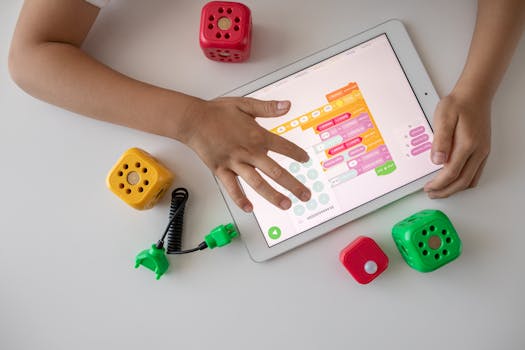
Child using digital tablet for coding education alongside colorful toy blocks. Photo: Robo Wunderkind / Pexels
Identifying the absolute best educational apps for kids requires a nuanced approach, as 'best' is highly subjective and depends on a child's age, learning style, and specific needs. However, certain apps consistently rise to the top due to their robust educational content, engaging interfaces, and proven track record in fostering learning. For early learners (ages 2-5), apps that focus on foundational skills like letter recognition, phonics, number sense, and shape identification are crucial. Programs like **ABCmouse** excel in providing a comprehensive, curriculum-based learning environment covering reading, math, art, and science through interactive games, puzzles, and activities. Its structured approach ensures a progressive learning path, making it a favorite among parents for its holistic development model. Similarly, **Khan Academy Kids** offers a delightful and completely free platform for young children, featuring thousands of educational activities, books, and games that promote early literacy, math, and social-emotional skills, all designed by learning experts. Its character-driven lessons make learning an adventure. Moving into elementary school (ages 6-10), the focus shifts towards reinforcing core subjects and introducing more complex concepts. For math, **Prodigy Math Game** stands out by transforming math practice into an epic fantasy role-playing game. Children solve curriculum-aligned math problems to cast spells and battle monsters, making learning incredibly engaging. For reading and language arts, **Epic!** provides access to a vast digital library of over 40,000 books, audiobooks, and learning videos, personalized to a child's interests and reading level. It encourages independent reading and vocabulary expansion. Science exploration is brilliantly handled by apps like **Toca Lab: Elements**, which allows children to experiment with elements in a virtual lab, fostering curiosity about chemistry in a safe and fun way. Meanwhile, **Duolingo Kids** makes learning a new language accessible and fun for this age group, using game-like lessons to teach Spanish, French, and English. These apps bridge the gap between play and structured learning, ensuring that children remain motivated while building essential academic skills. For older children and pre-teens (ages 10-14), the best educational apps often delve deeper into specific subjects, encourage critical thinking, and prepare them for more advanced studies. **Minecraft: Education Edition** transforms the popular building game into a powerful learning tool, allowing students to explore historical events, solve complex engineering challenges, and even learn coding within the familiar Minecraft environment. It promotes collaboration, creativity, and problem-solving. For science, **Human Body by Tinybop** offers an interactive and detailed exploration of human anatomy, allowing kids to 'dissect' and learn about various organ systems. For history and social studies, apps that offer interactive timelines, virtual field trips, or simulation games can bring subjects to life. Coding apps like **ScratchJr** (for younger kids) and **Scratch** (for older kids) provide visual programming languages that teach computational thinking and logic, empowering children to create their own games and animations. It's crucial for parents to regularly assess their child's engagement and learning outcomes with these apps, ensuring they remain beneficial. The goal is to leverage these digital tools to complement school education, fill learning gaps, and ignite a passion for discovery. Regular discussions about what they are learning and how they are applying their knowledge further enhances the educational value of these apps. For more insights on digital learning, visit our education hub.

Maximizing Learning: Tips for Parents and Common Pitfalls to Avoid

A mother guides her daughter through homework at home, fostering education and bonding. Photo: Annushka Ahuja / Pexels
While educational apps offer immense potential, their effectiveness largely depends on how they are integrated into a child's routine and supervised by parents. To truly maximize the learning benefits, it's essential to adopt a proactive and balanced approach. Firstly, **co-play and engage with your child**. Don't just hand over the tablet; sit with them, ask questions about what they're doing, and discuss the concepts they're learning. This interaction not only strengthens your bond but also helps solidify their understanding and makes the learning experience more meaningful. Secondly, **set clear boundaries for screen time**. Even the best educational apps can become less effective if used excessively. Establish consistent time limits that are appropriate for your child's age and incorporate app usage into a broader schedule that includes outdoor play, reading physical books, and social interactions. A balanced approach prevents digital fatigue and encourages diverse forms of learning. **Here are some common pitfalls to avoid when using educational apps:** * **Over-reliance on apps:** While valuable, apps should supplement, not replace, traditional learning methods, human interaction, and real-world experiences. Ensure a varied learning diet. * **Ignoring app reviews and privacy policies:** Not all apps are created equal. Always check reviews, look for apps developed by reputable educational organizations, and scrutinize privacy policies to protect your child's data. * **Allowing unrestricted access to in-app purchases and ads:** Many 'free' apps use in-app purchases and ads to generate revenue. Disable these features through parental controls to prevent accidental spending and exposure to inappropriate content. * **Not matching apps to learning styles:** Every child learns differently. An app that works wonderfully for one child might not resonate with another. Be flexible and willing to try different options until you find what truly engages your child. * **Failing to monitor progress and engagement:** Regularly check your child's progress within the app and observe their level of engagement. If an app isn't holding their attention or they're not making progress, it might be time to switch to a different one. By being an active participant in your child's digital learning journey, setting thoughtful boundaries, and avoiding common missteps, you can transform screen time into a powerful tool for intellectual growth and development. Remember, the goal is to cultivate a love for learning, and educational apps, when used wisely, are an excellent resource to achieve that.

Comparison

FeatureABCmouse (Ages 2-8)Prodigy Math (Ages 6-14)Khan Academy Kids (Ages 2-8)
Core FocusComprehensive CurriculumMath Practice (RPG)Early Learning & Literacy
Cost ModelSubscriptionFreemium (Paid Upgrades)Completely Free
Curriculum Alignment✓ (Common Core, etc.)✓ (US/CA Standards)✓ (Head Start, Common Core)
Engagement StyleStructured ActivitiesGame-based (RPG)Playful, Character-driven
Parental ControlsRobustModerateGood
Ad-Free✗ (some promotions)
Offline AccessLimitedLimited

What Readers Say

"ABCmouse has been a game-changer for my 4-year-old. She's learning to read and doing simple math without even realizing it's 'schoolwork.' It's truly one of the best educational apps for kids we've tried."

Sarah J. · Austin, TX

"My son used to dread math, but Prodigy Math Game has completely turned that around. He asks to play it every day, and his grades have improved significantly. It's an incredible way to make learning fun."

Mark D. · Seattle, WA

"Khan Academy Kids is a lifesaver. My daughter loves the characters, and I love that it's completely free and packed with high-quality educational content. She's learning so much about letters and numbers."

Jessica L. · Miami, FL

"Epic! has opened up a world of books for my 8-year-old. While the selection is fantastic, I sometimes wish there were more interactive elements beyond just reading. Still, a solid choice for encouraging literacy."

David R. · Denver, CO

"We started using Duolingo Kids for Spanish, and it's amazing how quickly my kids are picking up new words. The short, game-like lessons keep them engaged and coming back for more. Highly recommend for language learning."

Emily P. · Boston, MA

Frequently Asked Questions

What age group benefits most from educational apps?

Educational apps are beneficial across all age groups, from toddlers to teenagers. For preschoolers, they build foundational literacy and numeracy. Elementary students can reinforce core subjects and explore new interests. Older children can delve into advanced topics like coding or foreign languages, making learning accessible and engaging for various developmental stages.

Are educational apps safe for my child?

The safety of educational apps depends on the specific app and parental supervision. Reputable apps prioritize child safety through strict privacy policies, age-appropriate content filters, and often offer ad-free experiences. Always check privacy policies, reviews, and utilize parental controls to ensure a safe digital environment for your child.

How do I choose the right educational app for my child?

To choose the right app, consider your child's age, interests, and specific learning goals. Look for apps with strong educational foundations, engaging and intuitive interfaces, positive reviews from other parents and educators, and robust parental controls. Free trials can also help you assess an app's suitability before committing.

Are free educational apps as good as paid ones?

Many free educational apps, like Khan Academy Kids, offer exceptional quality and comprehensive content without any cost. Paid apps or subscription services often provide a broader range of content, an entirely ad-free experience, and more advanced features. The 'best' option depends on your budget and specific needs, as both free and paid tiers can be highly effective.

How do educational apps compare to traditional teaching methods?

Educational apps complement, rather than replace, traditional teaching methods. They offer personalized learning paths, immediate feedback, and gamified experiences that can boost engagement and cater to diverse learning styles. Traditional methods provide human interaction, critical social development, and hands-on experiences that apps cannot fully replicate. A blended approach is often most effective.

Who should use best educational apps for kids?

Parents and guardians looking to supplement their child's learning, educators seeking engaging tools for the classroom, and children themselves who are curious and enjoy interactive learning can all benefit from the best educational apps. They are particularly useful for children needing extra practice in specific subjects or those with a keen interest in exploring new topics independently.

What are the risks of excessive screen time with educational apps?

Excessive screen time, even with educational apps, can lead to potential risks such as eye strain, sleep disturbances, reduced physical activity, and social isolation. It's crucial to set healthy screen time limits, encourage breaks, and ensure a balanced daily routine that includes a variety of activities to mitigate these risks.

What are the future trends in educational apps for kids?

Future trends in educational apps include increased integration of Artificial Intelligence (AI) for more adaptive and personalized learning paths, augmented reality (AR) for immersive experiences, and greater focus on social-emotional learning (SEL) skills. We can also expect more apps that facilitate collaborative learning and connect directly with school curricula.

Empower your child's learning journey today by exploring the best educational apps for kids. With the right tools, you can transform screen time into a powerful catalyst for curiosity, knowledge, and academic success. Start building a brighter future, one engaging app at a time!

Topics: best educational apps for kidslearning apps for childrenkids education technologyeducational games for kidsscreen time learning
Leo List
Brampton weed
Adultwork